
Use IP Pilot’s Analyze feature to see which local firms a foreign law firm partners with when sending cases to your jurisdiction and to discover the top clients represented in those exchanges. This insight can guide your business development and partnership strategy.
To Research Foreign Law Firm Partnerships and their Top Clients in Your Jurisdiction
1. Access the Law Firm Profile
- Click on Analyze in the left navigation bar.
- Select Law Firms.
- In the search bar, type the name of the foreign law firm you want to research.
- If the firm has multiple entities, you can select one, or more to view them together.
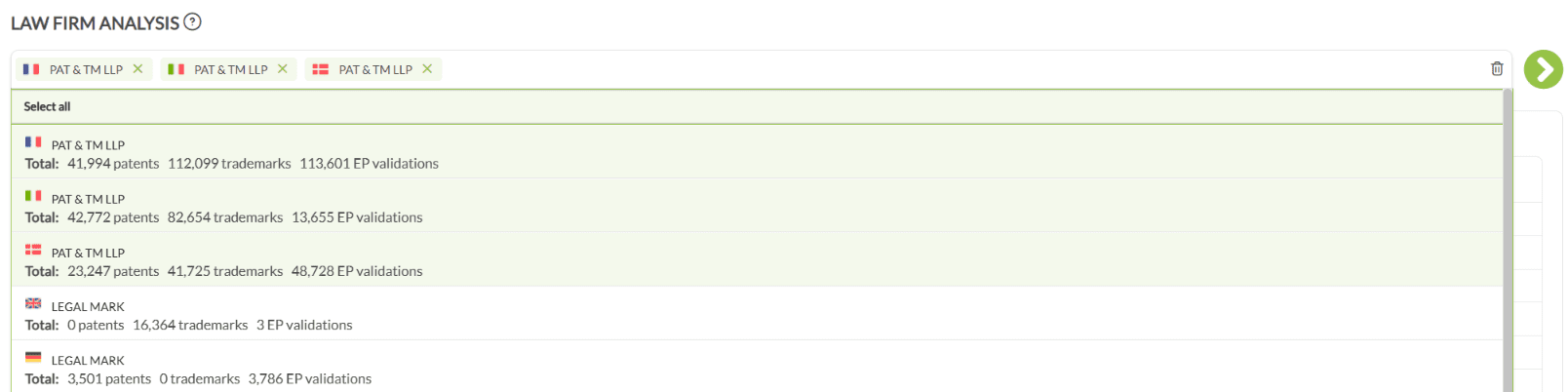
- If you do not find the firm at the top, scroll to the bottom of the results, and check the Unconfirmed Law Firms section, as the entity may be listed there.

- Click the icon on the right to view the Law Firm profile.
2. Navigate to the Case Exchange Tab
- By default, you’ll land on the Overview page.
- Click on the Case Exchange tab to view international partnership data.
3. Set Up the Right Filters
- On the right side, ensure Year Type is set to Case Exchange Year for accurate results.
- Choose the appropriate time period.
- Note: For patents, avoid using the latest year due to publication delays.

- Decide how you want to filter receiving firms:
- To focus on firms filing in your jurisdiction (e.g., EP, WO, US, etc.), select the relevant publications authorities from the Target Publication Authority chart.
- To focus on firms located in your country (e.g., CA, US, etc.), select the relevant country from the Receiving Representative’s Country chart.
- You can also search for relevant publication authority or country by typing it into the search bar above the charts.

4. View Important Partners
- Scroll down to the Important Partners chart.
- Here, you’ll see a list of law firms that have received cases from the selected law firm, along with the number of cases exchanged.
- By default, this chart includes both sent and received cases.
- Tip: This chart gives you an overview of the main partner firms but does not by default indicate who was the decision maker in choosing the foreign partner.

5. Identify the Decision Maker (Recommended)
- To focus your business development efforts, it’s crucial to know who decided which foreign firm would handle the case.
- Scroll up to the Presumed Decision Maker chart.
- Select Law Firm as the decision maker.
- Now, the data will show only those cases where the law firm was presumed to be the decision maker in referring work to firms in your jurisdiction.
- This helps you identify which partners from your jurisdiction were chosen by the foreign law firm, making your outreach more targeted.

6. See the Top Clients Being Represented
- To find out which clients the foreign law firm is representing when sending cases into your jurisdiction:
- Click on the Overview tab at the top.
- Scroll to the Important Clients chart.
- This chart will show you the key applicants/clients for whom the foreign firm has sent cases to your jurisdiction, helping you understand the client relationships.

Example Scenario
Suppose you want to see which Canadian firms a major U.S. IP law firm is partnering with, and which clients are driving this activity:
- Go to Analyze → Law Firms and search for the U.S. firm’s name.
- Open their profile.
- Go to Case Exchange, ensure Year Type is set to Case Exchange Year, choose a suitable year range, and filter receiving firm’s country as Canada.
- Scroll down to Important Partners to view the top Canadian firms partnered with the U.S. firm.
- Scroll up to the Presumed Decision Maker chart and set to Law Firm. Now you see the partners chosen by the U.S. firm.
- Switch to the Overview tab and check the Important Clients chart for the top clients behind these referrals.
Best Practices & Tips
-
Always use the Decision Maker filter for a more accurate business development strategy. It ensures you’re targeting firms chosen by the foreign law firm.
- If multiple entities exist for a law firm, analyze them both individually and collectively for a complete picture.
- For the most accurate and current results (especially for patents), avoid the most recent year due to potential data lag.
- Use Important Clients chart to uncover client relationships that could be strategic for your growth.
Need further help with law firm analytics or navigating profile data? Contact our support team at support@ip-pilot.com.
