
Published, December 2024 · Updated, November 2026
IP Pilot Pro: the full picture of who works with whom
Standard shows you the filing record. Pro shows you the relationships behind it: the partners and clients you share with a target, where your technical fields overlap, and which firms resemble the ones you already trust. Then it puts AI on top. AutoPilot reasons across all of it at 50 questions per user per day, Deep Research turns it into an action plan, and the MCP connector brings it into the AI tools your firm already uses.
One subscription, firm-wide. Fewer browser tabs, better-prepared meetings.
IP Pilot Pro covers four things: AutoPilot at full depth, tools to see the relationships, tools to prepare the meeting, and tools to act on it.
Book a demo, and we will show you what Pro surfaces about your own network.
AutoPilot, at the depth a BD decision needs
On Pro, AutoPilot answers 50 questions per user per day, ten times the Standard allowance. Every answer comes from IP Pilot’s resolved relationship and filing data, not from a general model guessing on the fly.
50 questions per user per day
Ask in plain language and get a precise answer from the data. Mid-profile, AutoPilot reads the analysis you have built and suggests your next step.
Deep Research, up to 10 per day
Go from what happened to what to do next. AutoPilot reasons across your network and builds a strategic action plan. Deep Research counts toward the 50 daily questions.
IP Pilot MCP connector
Brings IP Pilot’s patent and trademark relationship data into Claude, ChatGPT, Gemini or Copilot. It appears next to your internal data, without opening IP Pilot.
See the relationships
Network Overlap
Tech Overlap
Similar Entities
Entity Grouping
Prepare the meeting
Compare Entities
Custom View
Insights Tab
Filing View
Act on it
Attorney Profiles
About Tab
Excel Autofill
Push to CRM
See the relationships
The filing record implies who works with whom; it never says so. These features resolve the entities and detect the connections for you.
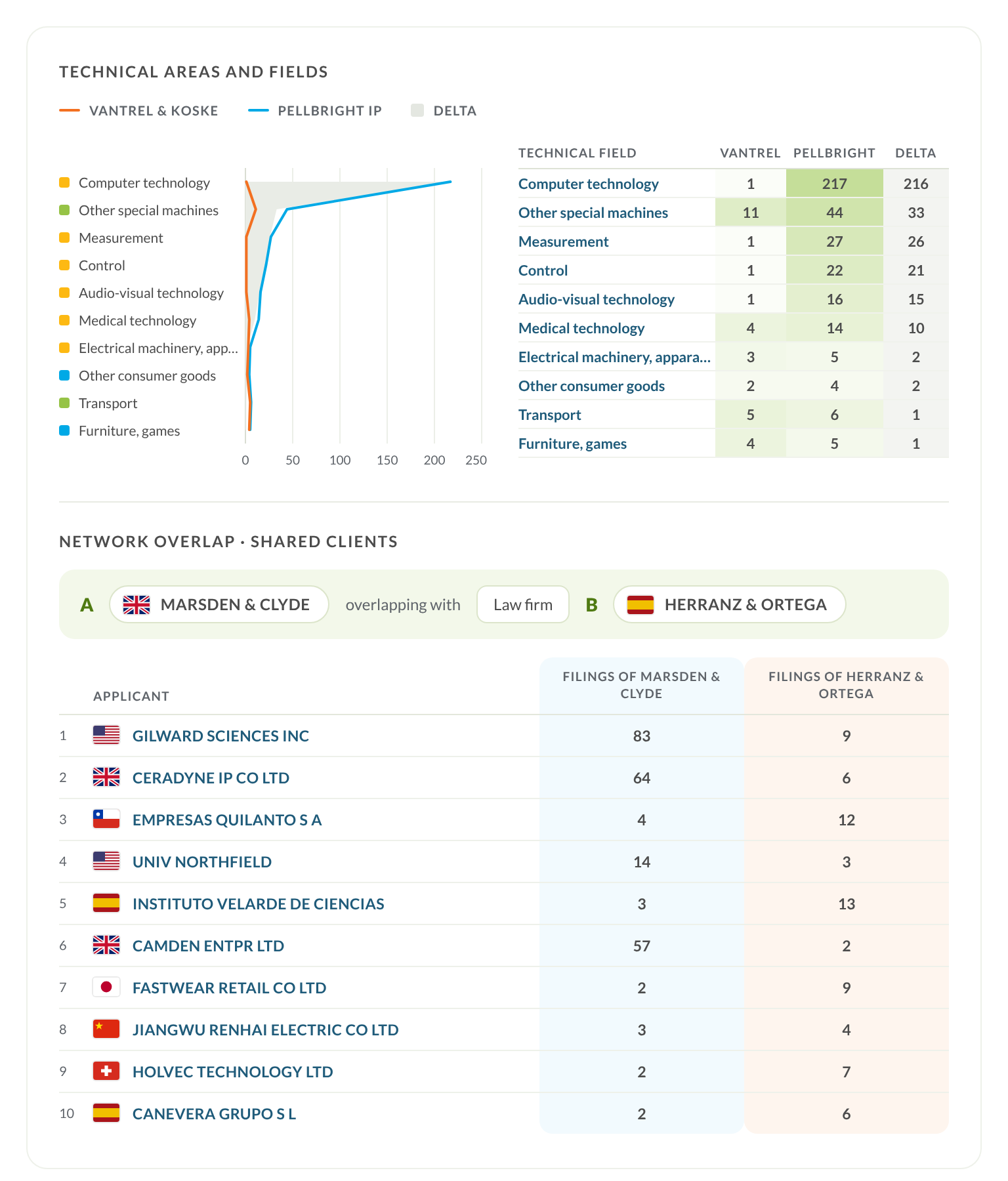
Network Overlap
WHAT IT SHOWS
WHEN YOU’D USE IT
Every partner and client you share with a target firm or applicant, filterable by country and more.
Before outreach. The firms you both work with are your warmest introductions.
Tech Overlap
WHAT IT SHOWS
WHEN YOU’D USE IT
Two entities’ technology compared at IPC level, with overlaps, white spots and potential conflicts of interest flagged.
Before proposing a partnership, rather than discovering the conflict in the first meeting.
Similar Entities
WHAT IT SHOWS
WHEN YOU’D USE IT
Firms or applicants with a comparable technical, geographical and volume profile, and why each one matched.
To find alternatives to a partner you already trust, or competitors you had not counted.
Entity Grouping
WHAT IT SHOWS
WHEN YOU’D USE IT
Corporate subsidiaries resolved to their parent, so a group’s full portfolio appears as one.
When a client files through several entities and a single-name view undercounts them.
Prepare the meeting
Everything you would otherwise assemble across six browser tabs, in one view.
Compare Entities
WHAT IT SHOWS
WHEN YOU’D USE IT
Two to four firms or applicants side by side, with any profile chart.
To explain, with numbers, why one partner over another.
Custom View
WHAT IT SHOWS
WHEN YOU’D USE IT
Your chosen charts saved as a personal tab, loadable on every profile.
When you check the same five charts on every firm.
Insights Tab
WHAT IT SHOWS
WHEN YOU’D USE IT
Connections, relationships and case gaps between your firm and the profile you are on, without filling in a separate form.
For a quick read. Switch to the full feature when you need filters.
Filing View
WHAT IT SHOWS
WHEN YOU’D USE IT
The underlying filings behind any search, ready to export.
For example, to list Korean PCTs approaching the national-phase deadline.
Act on it
Knowing which firm matters is half the job. These features get you to the right person, and keep your CRM in step with the market.
Attorney Profiles
WHAT IT SHOWS
WHEN YOU’D USE IT
Filing stats, contact details and LinkedIn links for the people inside a firm.
To know whom to call, not just which firm.
About Tab
WHAT IT SHOWS
WHEN YOU’D USE IT
Addresses, websites, LinkedIn pages and connected entities (parents and subsidiaries) for any firm or applicant.
Instead of a detour through general data providers.
Excel Autofill
WHAT IT SHOWS
WHEN YOU’D USE IT
Your Excel list of applicants, firms or attorneys matched against IP Pilot, with the fields you choose filled in, such as filing counts or top partners.
When you have 200 names and no wish to open 200 profiles.
Push to CRM
WHAT IT SHOWS
WHEN YOU’D USE IT
Entities and their data sent from IP Pilot to HubSpot, Salesforce or Microsoft Dynamics, with a choice on how to handle conflicting fields.
So your CRM reflects the market, not last year’s copy-and-paste.
Ready to see what the data knows about your relationships?
IP Pilot Pro is for firms that would rather know than guess. Book a demo, and we will show you what it surfaces about your own network.