
A People profile holds IP Pilot’s data for one individual rather than for an organization: whose name is on which filings, which applicants that person files for, the technical fields the work falls into, which firms they have worked for over time, and how to reach them. It is the fastest way to build a picture of an attorney’s client portfolio before you meet them.
Law Firms and Applicants cover the same ground at organization level. Navigating the App explains the sidebar, the year range, the year type and the filters, which work the same way on every screen.
Before you start #
People is on Pro. The sidebar item carries a pro badge, and so does the About tab inside a profile, which is where contact details and career history sit. Versions explains where to check which version you have access to.
1. Open a person’s profile #
- 1Open PeopleIn the left sidebar, click the chevron beside Analyze, then People.
- 2Type the person’s nameEnter the first and last name. Matching is on the personal name, so typing a firm name returns people whose surname happens to match it rather than the firm itself.Note: Spellings vary between IP offices. If a full name returns nothing, try the surname on its own before concluding the person is absent.
- 3Tick who you wantSelect the checkbox beside each person, or use Select all. Do this even for one person: the load button stays grayed out until something is ticked.
- 4Load the profileClick the green arrow at the end of the search bar. Several people load as one combined profile, labeled with the first name and a count of the rest.
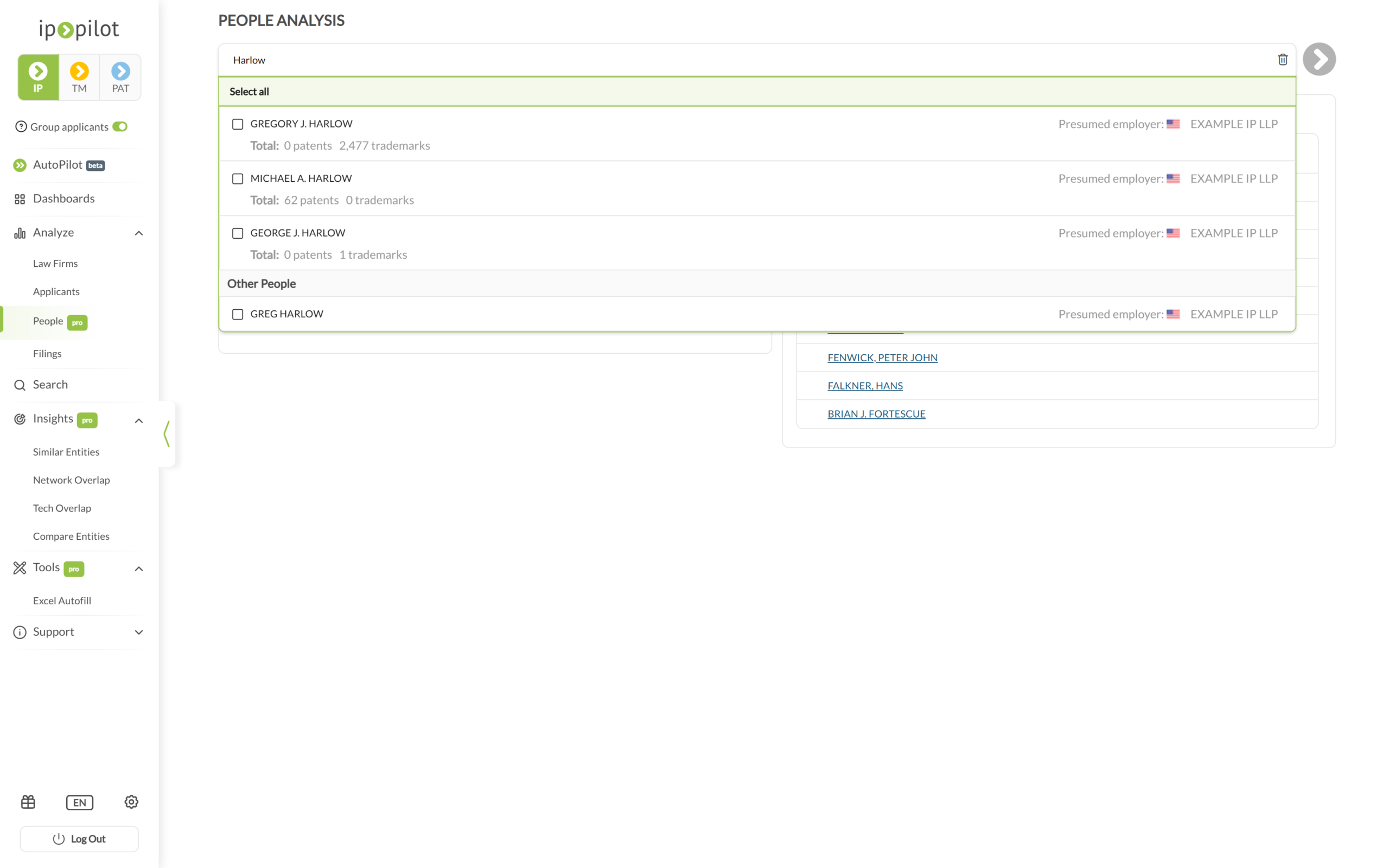
Each suggestion shows the person’s name, a Total: line giving their patent and trademark counts, and Presumed employer: with a country flag and the firm. Below the named matches, Other People groups entries IP Pilot holds a name for but no filing totals.
Two routes to an individual. Analyze › People opens a standalone profile and does not require knowing where the person works. Separately, the About tab of a law firm or applicant profile carries a People panel listing the practitioners at that entity, where toggling a name filters that profile to their activity. Start from People when you know who you are looking for, and from the firm’s About tab when you want to see who works there.
2. Read the header #
The header names the person and summarizes them before you open any tab.
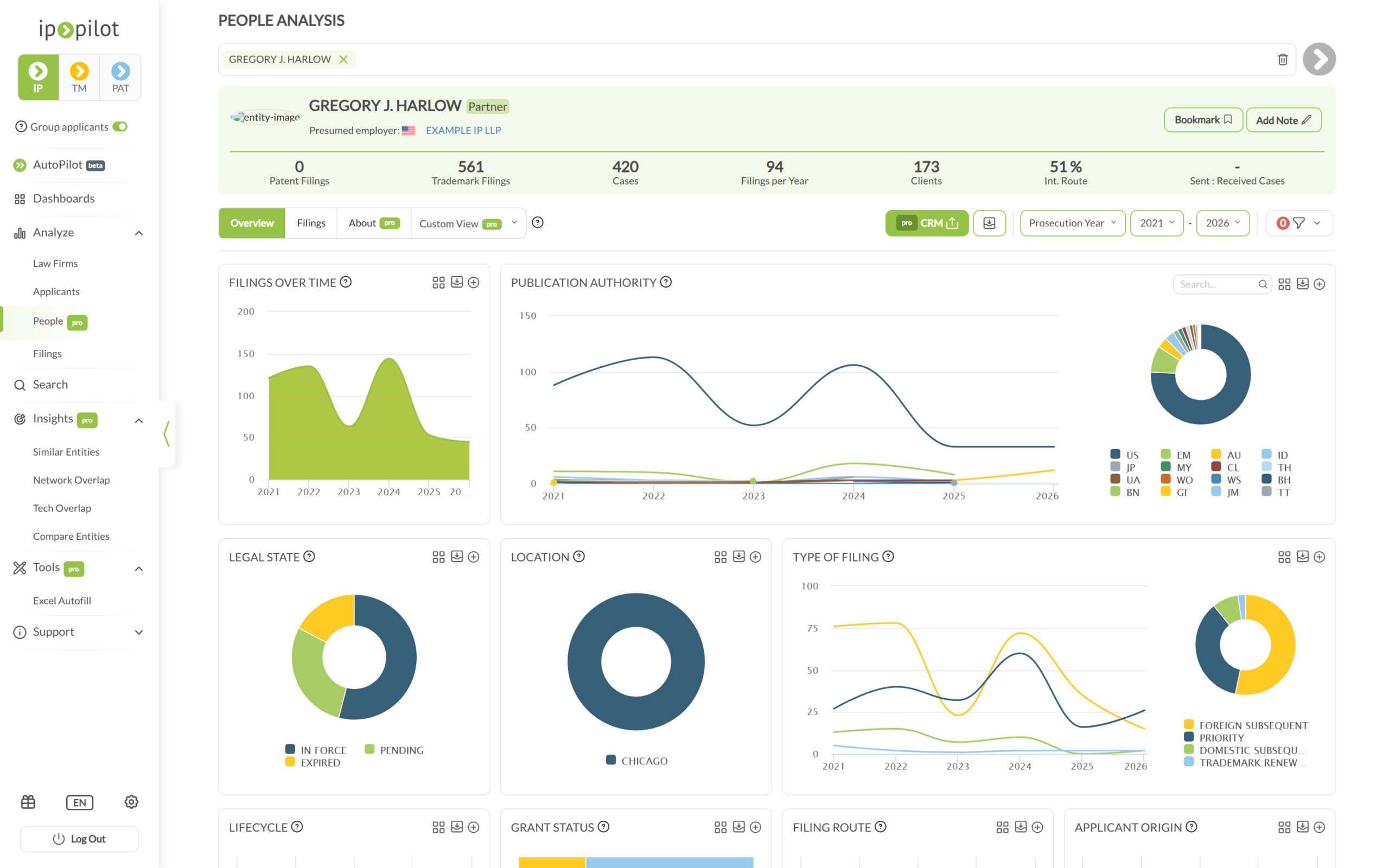
- The name, with a role badge where the record carries one, for example Partner.
- Presumed employer: with a country flag and the firm name. The firm name is a link through to its own profile, so you can move from the person to the organization in one click.
- Bookmark and Add Note at top right.
- A KPI bar carrying Patent Filings, Trademark Filings, Cases, Filings per Year, Clients, Int. Route and Sent : Received Cases. Int. Route is the only percentage and it is not a market share figure. Sent : Received Cases shows a dash where there is no exchanged-case data for the individual.
3. Read the Overview tab #
Overview answers two questions about a person: who they file for, and in what.
| Section | Charts |
|---|---|
| Volume and status | Filings Over Time · Publication Authority · Legal State · Location · Type of Filing · Lifecycle · Grant Status · Filing Route · Applicant Origin |
| Clients | Client’s Country · Important Clients Over Time · Important Clients |
| Technology | IPC Sections & Symbols · Technical Areas & Fields · Technical Areas Over Time |
| Trademarks | Trademark Category · Nice Classes · Verbal Elements |
Important Clients is the one to read first. It lists the applicants the person has filed for, with Patent Filings, Trademark Filings and Total Filings for each, and Show more opens the full list. That is the individual’s client portfolio rather than the firm’s, which is what makes it useful before a meeting.
Technical Areas & Fields and IPC Sections & Symbols are the best available read on what someone is specialized in, since they describe the work rather than a job title.
4. Read the Filings tab #
The Filings tab lists the individual applications naming that person. Selected Fields chooses the columns and XLSX Table Export downloads the table. The default columns are Application Number, Applicant, Title or Verbal Element, Type of Filing and Prosecution Date.
Filings explains what each field means and what else Selected Fields offers.
5. Read the About tab #
About is where a People profile stops resembling a firm profile. It holds a career record rather than an organization record, and it needs Pro.
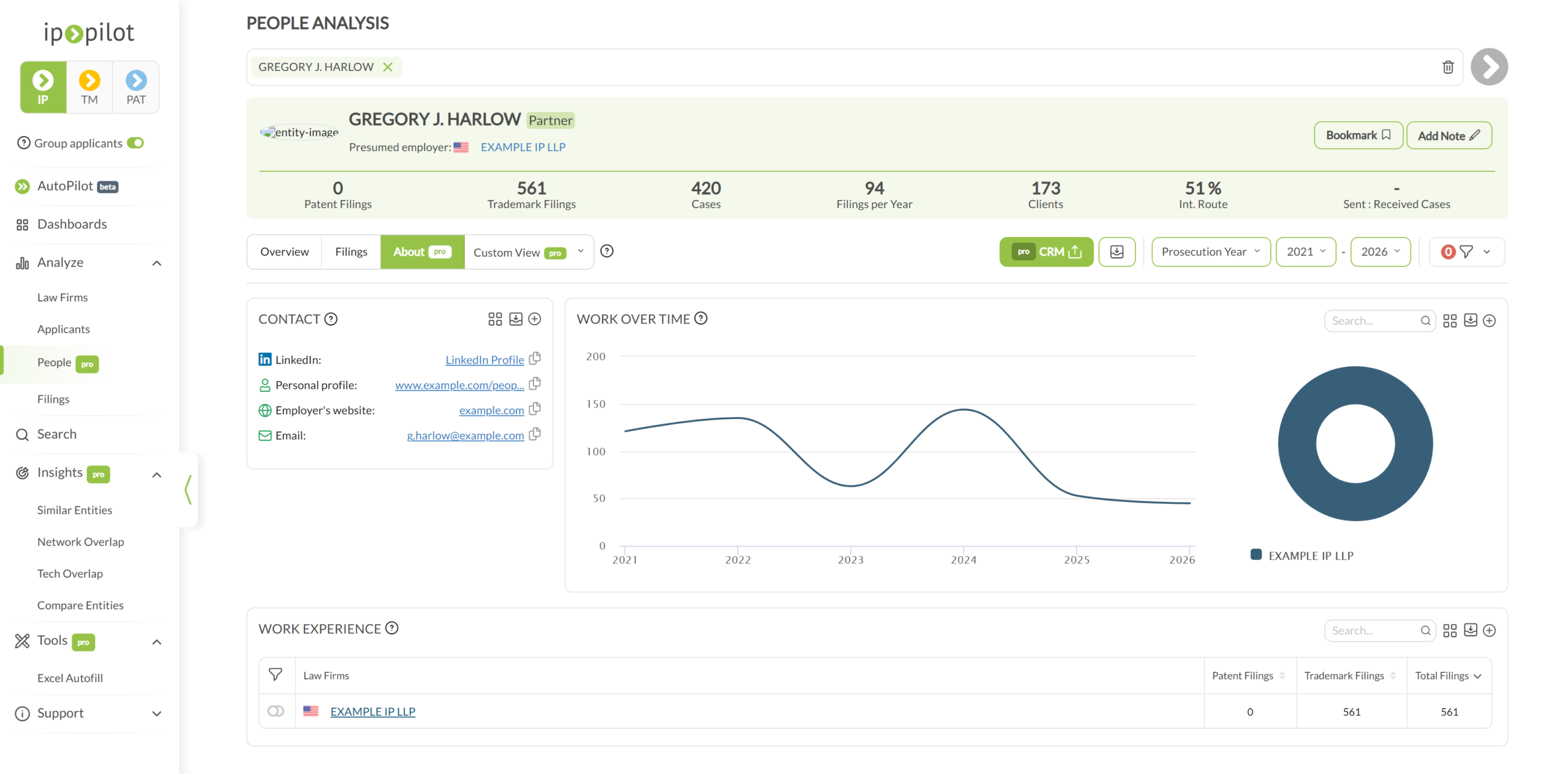
- Work Experience lists a row per firm, with the filings made at each. It covers every firm that appears alongside the person in the record, so a career spanning several employers stays visible instead of collapsing into the current one.
- Work over Time shows the same history as a chart, so you can see when a move happened rather than only that it did.
- Contact holds LinkedIn, a personal profile, the employer’s website and an email address, drawn from publicly available sources. Each value has a copy icon beside it. The panel is fuller for some people than for others.
Why the career view matters commercially. A mandate that looks as though it left one firm may have followed the attorney to another. Reading Work Experience alongside Important Clients tells you whether you lost a client or lost a person.
6. Compare people and share a profile #
The year range, the year type and the filters sit in the control bar and behave as they do on any other profile. Two things matter when the subject is a person rather than a firm.
- Set the year range deliberately. An individual’s record spans several employers. A wide range mixes current work with a job left a decade ago, so narrowing to recent years is the read on what someone does now.
- Use Lock Filters before loading the next person. Two attorneys are only comparable when both are filtered the same way. The padlock appears once at least one filter is active.
A profile link carries the year range, the year type and any active filters with it, so a colleague with an IP Pilot account opens the view you were looking at. Exports covers taking the data itself out, chart by chart or as a PDF.
Good to know #
- An individual’s volumes are a floor, not a total. The name of the person who did the work is not always in the raw filing data. Whether it appears depends on the policies of the IP office and on the filing practice of the firm, and many firms name only the firm. Filings with no name cannot be attributed to anyone.
- So a person’s figures will not add up to their firm’s. A firm profile counts everything filed under the firm, named or not. Adding up the individuals will always fall short.
- Names are consolidated across sources. Filings, publicly available online sources and external databases are matched so that one person appears once. A change reaches IP Pilot only after it has been published somewhere, so a recent move between firms may not show yet.
- If someone you know is missing, write to support@ip-pilot.com and we will look at adding them.
Frequently Asked Questions #
Frequently Asked Questions #
People #
Where does the attorney data come from?
Attorney names are taken from patent and trademark filings, from publicly available online sources, and from external databases that collect information about individuals. IP Pilot consolidates and matches those sources so that one person appears once, even where their name is spelled differently across offices. Where an attorney’s name is not listed on an application at all, those filings cannot be attributed to that individual.
How up to date is a person’s profile?
The profile reflects the latest publicly available information. Changes take time to reach us. A move to a new firm shows up once it has been published somewhere we can see it, not on the day it happens. Treat the current firm on a profile as the last one on record rather than a guarantee of where the person sits today.
Is the contact information compliant with data privacy law?
IP Pilot displays only publicly available information and holds no private data. Using that contact information to approach someone for business purposes is compliant, provided you have a legitimate interest in the matter or service you are contacting them about.
I know an attorney at a firm, but I cannot find them in People. Why?
An individual’s name is not necessarily included in the raw filing data. Whether it appears depends on the policies of the IP office in question and on the filing practice of the firm itself, since many firms name only the firm, not the person who did the work. If you would like a particular attorney listed, write to support@ip-pilot.com.
Where has the Attorneys tab gone?
There is no longer an Attorneys tab, but attorney data did not go away. It sits in two places now.
On a law firm or applicant profile, the About tab carries a People panel listing the practitioners at that entity. Toggling a name filters the whole profile to their activity.
For an individual in their own right, expand Analyze in the sidebar and click People, then search by name. That opens a standalone profile for the person rather than for their firm.
What is the difference between a representative, an attorney and an agent?
A representative is any person or entity named as agent on a patent or trademark application, or in some jurisdictions listed as correspondent instead, though that is usually still the representative. Terminology varies by country: some distinguish agents from attorneys, some allow general lawyers to represent clients before the IP office, and corporates often represent their own applications through in-house attorneys. “Representative” is therefore the only term that is accurate everywhere. IP Pilot says “law firm” where that is correct and “representative” where it would not be.
Does a profile show every firm a person has worked for?
It shows every firm that appears alongside that person in the filing record, so a career that spans several firms is visible over time. It is not an employment history: periods in which the person’s name was never published on a filing leave no trace, and a firm they worked at without being named will not appear.
Why do the figures on a person’s profile not add up to the firm’s figures?
A person’s profile counts only the filings on which that individual is actually named. A firm’s profile counts everything filed under the firm, named individuals or not. Because attorney names are missing from a large share of filings, adding up the people at a firm will always come to less than the firm’s own total. The gap is a coverage gap, not a contradiction.
Where do I find an attorney’s contact details?
On the About tab of their profile, once it is loaded. Contact details come from publicly available sources, so the tab is fuller for some people than for others.