
Two ways to decide who is worth meeting, and what to say when you do.
In this document
- Plan a BD trip and prioritize which current associates to meet, for partners you already have.
- Establish new connections at an upcoming conference, for firms you do not know yet.
Related, but covered elsewhere
- Vetting a firm properly before you commit a case to it is in Build partnerships.
- Working out what a partner sends elsewhere, which is the substance of an ask, is in Grow further.
- Seeing who else a partner works with in your jurisdiction is in Defend relationships.
1. Plan a BD trip and prioritize which current associates to meet #
This turns the partner list for one country into a short, ordered list of meetings, each with a reason attached.
Decide the objective first #
The charts below are read differently depending on what the trip is for. Settle that before opening anything: winning more inbound cases, improving reciprocity, or maintaining relationship health are three different shortlists.
Limit your own profile to the country you are visiting #
- Go to Analyze › Law Firms and open your own firm, selecting the relevant entities.
- Open Case Exchange, set the year type to Case Exchange Year and choose a recent multi-year window.
- Filter to the country you plan to visit.
Read the charts against the objective #
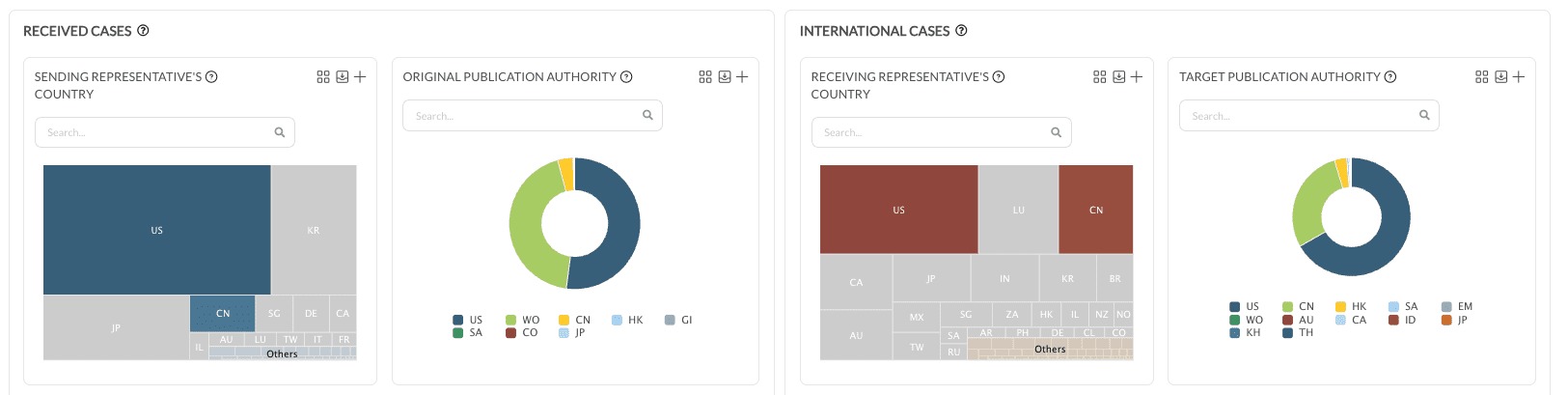
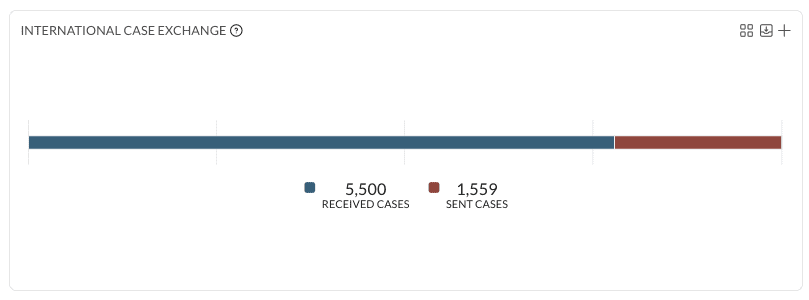
International Case Exchange gives the sent and received balance with that country. Important Partners lists the partner firms and the volumes exchanged in the period. Setting the decision maker to Law Firm narrows both to matters the partner actually chose.
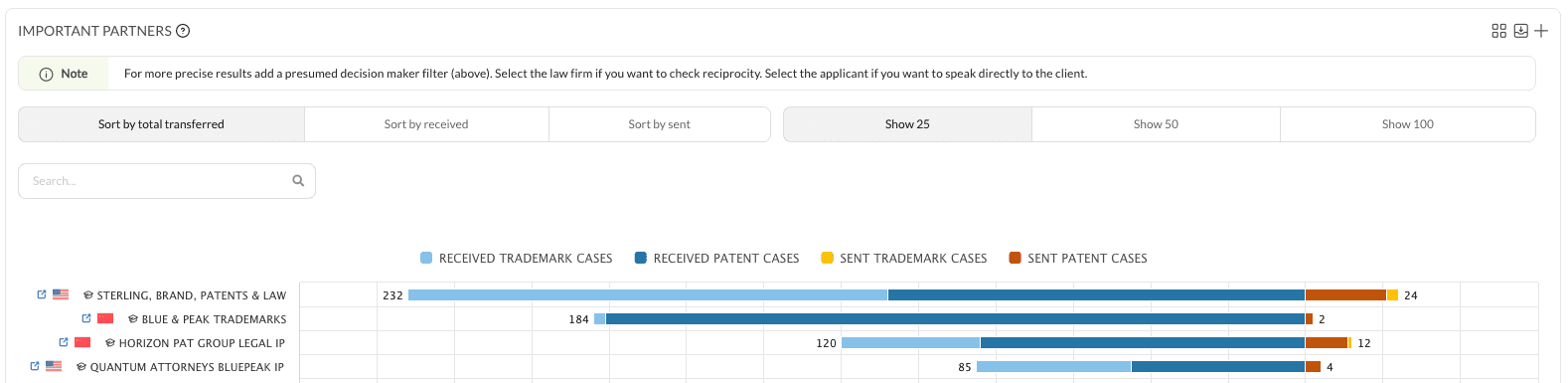
- Inbound growth: prioritize partners already sending to you, where the decision maker is the law firm.
- Reciprocity: flag partners where sent and received are lopsided in either direction, and plan the rebalance.
- Relationship health: include long-standing partners tied to strategic clients, even where current flow is modest. Volume alone would drop them from the list.

Drill into each shortlisted partner #
In Important Partners, clicking a partner’s name opens their profile in a new tab. Filters can be cleared for a clean view or kept for continuity.
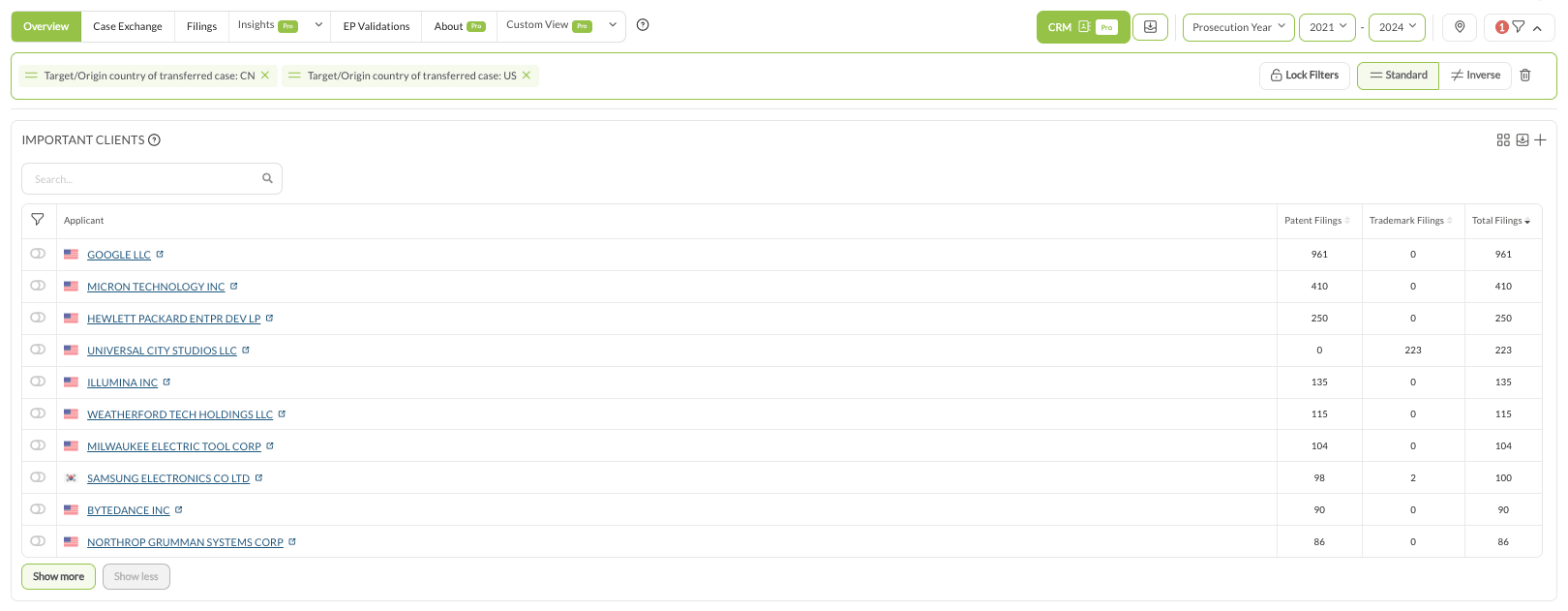
On their profile, open Case Exchange, set the decision maker to Law Firm and filter to your own jurisdiction, which shows what actually moves between the two firms. Overview › Important Clients then identifies the clients behind that flow, which is what makes a talking point specific rather than general.
Record the shortlist #
For each firm on the list, note the current sent and received position in that country, the key clients from Important Clients, and one objective for the meeting, such as increasing inbound chemistry work or rebalancing EP filings.
Practical notes #
- Three to five complete years gives a stable picture. Skip the current year for patents.
2. Establish new connections at an upcoming conference #
Build a target list of foreign law firms, cross it against the attendee list, then find a route to a conversation.
There are two ways to build the list, and they answer different questions. The first ranks firms by what they send into your jurisdiction. The second ranks by total exchange in either direction. Use the second if overall cross-border activity matters more than inbound volume.
Approach 1: firms sending cases to your jurisdiction #
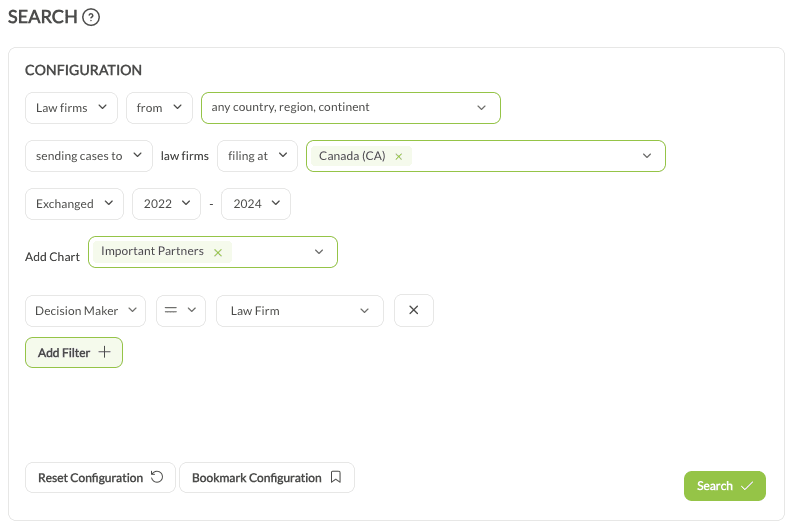
- Click Search in the sidebar.
- Set the first input to Law firms, from any country, region or continent.
- Set sending cases to law firms filing at your jurisdiction.
- Set the year type to Exchanged and a recent multi-year range, for example 2022 to 2024.
- In Add Chart, select Important Partners.
- Set the decision maker to Law Firm.
The result is the foreign firms most actively sending cases your way.
Approach 2: firms by overall case exchange #
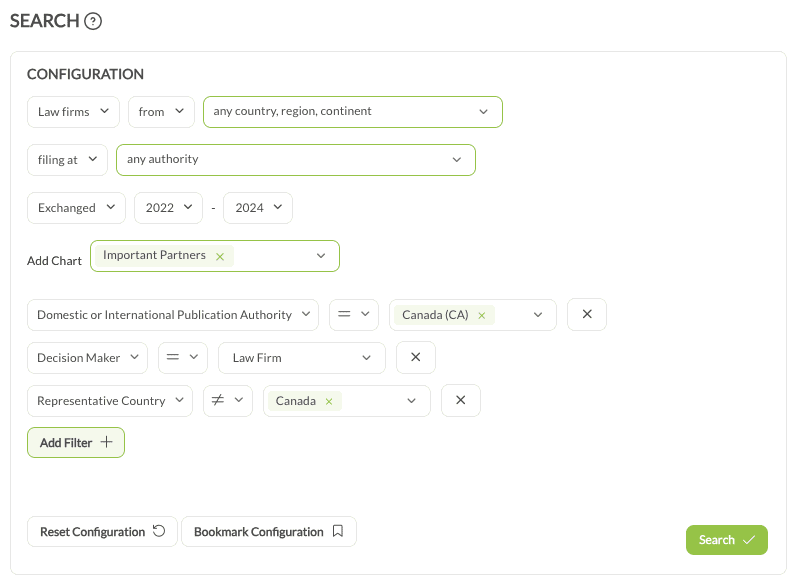
- Click Search in the sidebar.
- Set the first input to Law firms, from any country, region or continent.
- Set filing at to any authority.
- Set the year type to Exchanged and a recent multi-year range.
- In Add Chart, select Important Partners.
- Add these filters: Domestic or International Publication Authority set to your jurisdiction, the decision maker set to Law Firm, and representative country not equals your own country, which keeps the list foreign.
The result is the firms with the largest overall exchange with firms in your jurisdiction, in either direction.
Cross-reference the attendee list #
Take the conference attendee list and match it against the search results. The overlap is the priority list: high-potential firms that will physically be in the room.
Find a route to a conversation #
Without Pro, the target firm’s own website gives the contact details of the partners, BD managers or attorneys attending, for an approach by email or LinkedIn before the event.
With Pro, there are two better routes.
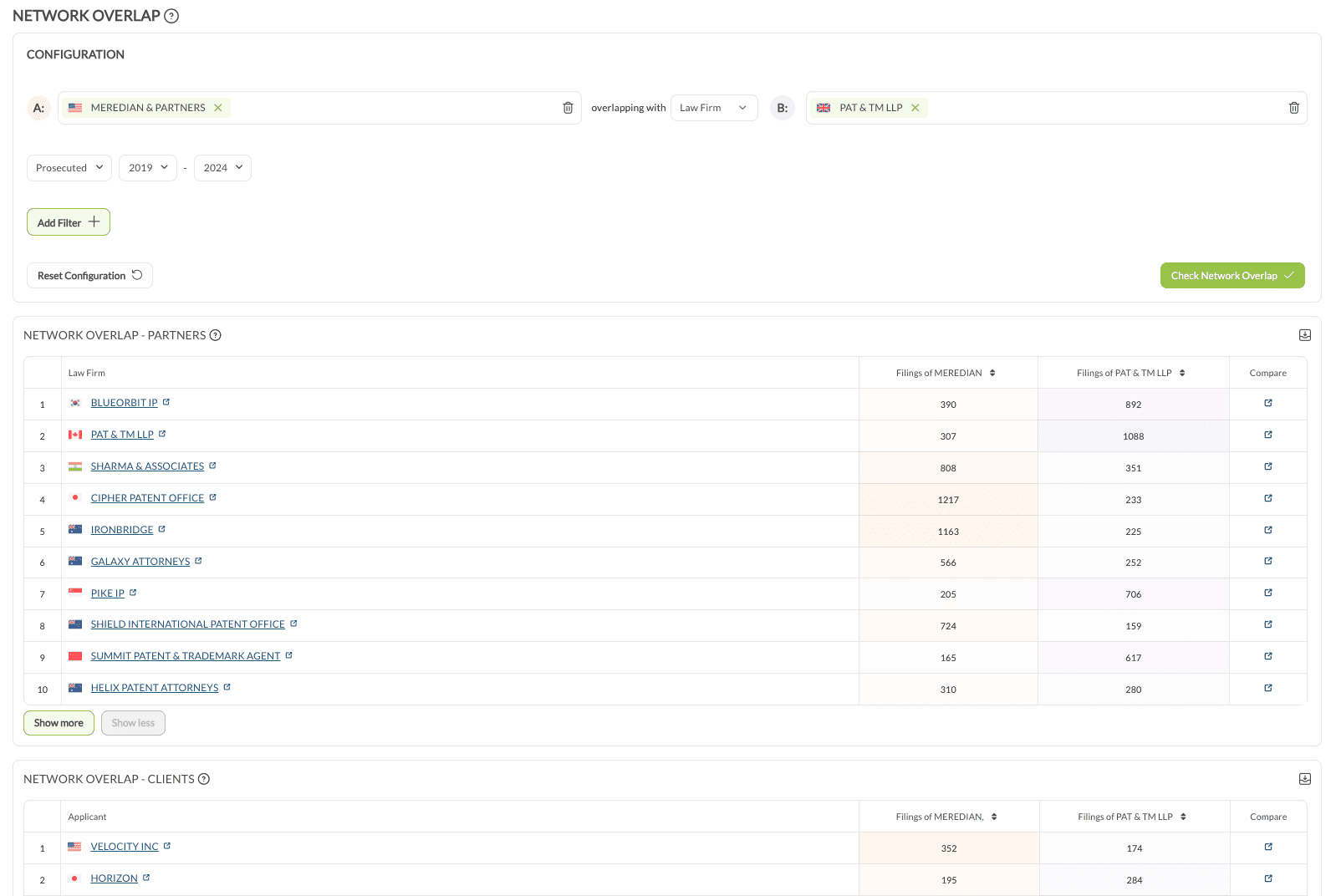
Network Overlap finds a mutual contact. Under Insights, open Network Overlap, put your own firm in A: and the target firm in B:, select a year range, then click Check Network Overlap. The first table lists mutual partner law firms and the second lists common clients. A mutual partner you have a strong relationship with is the shortest path to a warm introduction.
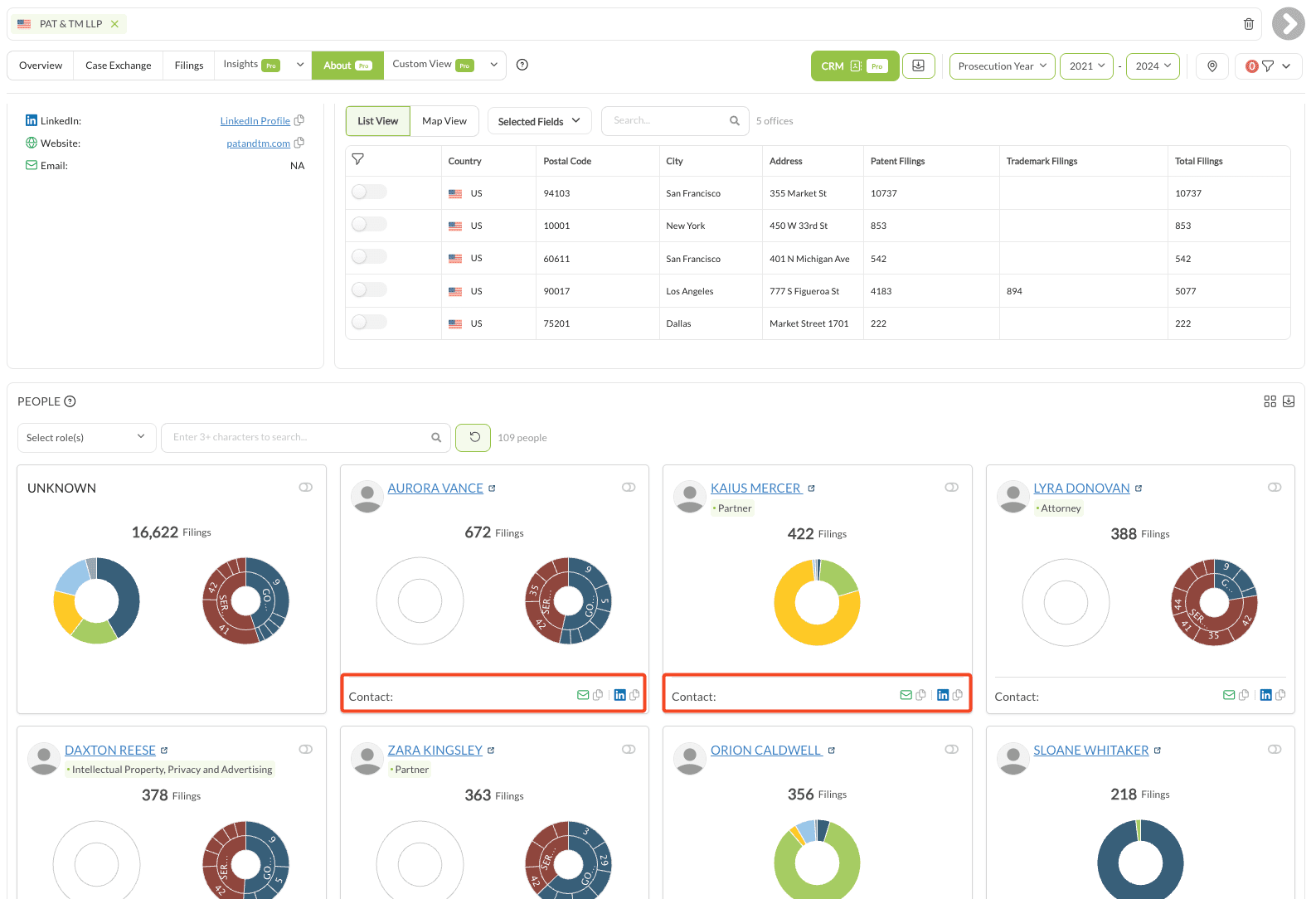
Direct contact comes from the firm’s own profile. On the About tab, the team member list carries a LinkedIn link and an email address per person.
Worked example #
A Canadian firm attending a global IP conference in the US:
- Approach 1 for the firms sending most cases to Canadian firms
- Approach 2 for the firms with the largest total exchange with Canadian firms
- Match both against the attendee list
- Per target, check Network Overlap for a mutual contact, or take a direct contact from the About tab